

Before you start
You need to be signed in. You get the full data if you have full download access to the dataset. Otherwise, the panel tells you that you are downloading a preview. See pricing.Load a dataset
1
Open the dataset
Apply any filters for columns, entities or dates. The link keeps them.
2
Copy the link
Click Download. Under Connect data, open Excel and copy the dataset link.
3
Paste it in Excel
In Excel, go to Data > From Web, paste the link and follow the prompts to load the table.
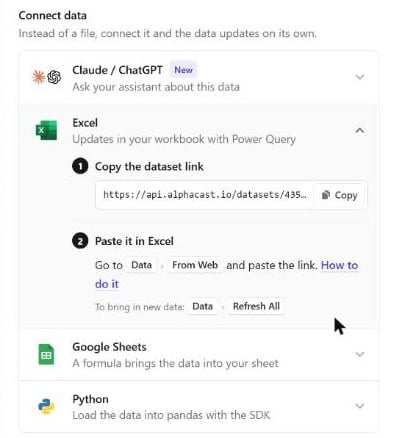
Refresh the data
Go to Data > Refresh All. Excel requests the link again and loads the data that Alphacast currently has, within your access and limits.Adjust what you load
Set these options in the panel before you copy the link:- Dates as columns: puts dates across the top.
- Include Variable IDs: adds the variable identifiers.
If it does not work
- You see only part of the data: check your download access to the dataset and your usage in Settings, under Membership.
- Refresh stopped working: if you reset your API key, copy a new link.
- You reached your download limit: check Settings > Membership.
- The dataset is too large: an Excel sheet has row and column limits. Filter the data first. The panel hides the XLSX option when the full result does not fit in a sheet.
- Columns changed: a query that expects certain columns can fail when the dataset structure changes.